The Big Picture
So you want to let an AI play Minecraft and stream it live to the internet? Yeah, we thought that sounded fun too, we is me and Opus 4.5. Here's how we built it (OK let's be honest, this is how Cursor built it for me)
The basic idea is simple: we have a Minecraft client running locally, we expose it as an MCP server so Claude can see and control it, we run Claude in a loop with the Claude Agent SDK, and we stream everything to Cloudflare where it gets served to viewers worldwide.
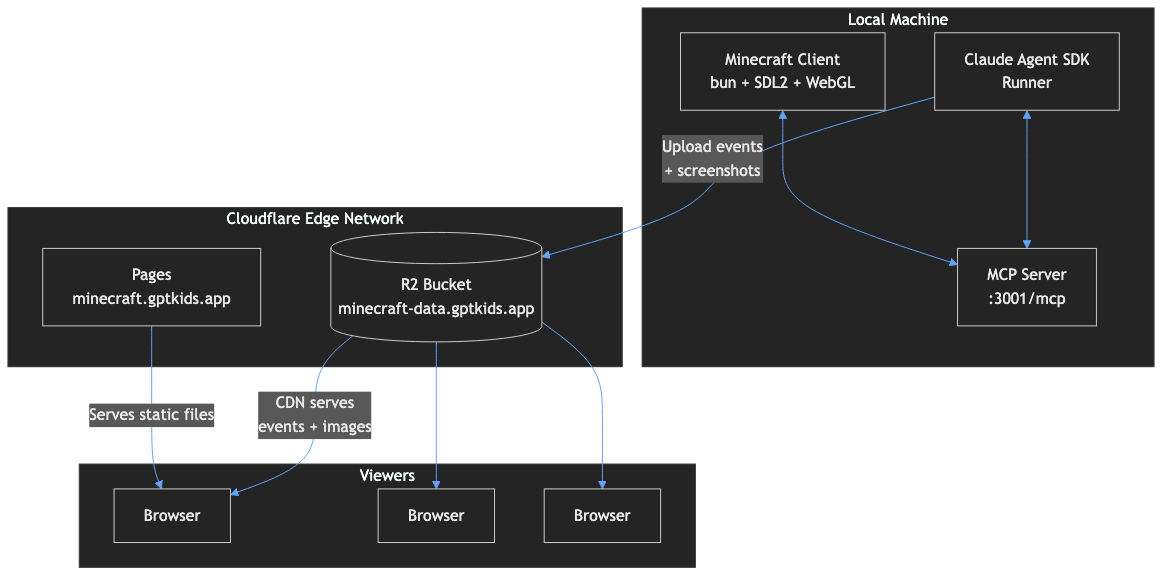
Let's break down each piece.
Exposing Minecraft as an MCP Server
What's MCP?
The Model Context Protocol (MCP) is an open protocol that lets LLMs connect to external tools and data sources. Think of it like the Language Server Protocol (LSP) that powers code intelligence in editors, but for AI integrations.
In December 2025, Anthropic donated MCP to the Linux Foundation's Agentic AI Foundation. It's now backed by Anthropic, OpenAI, Google, Microsoft, and AWS. Over 97 million SDK downloads per month!
MCP defines three main primitives:
- Resources - Data the AI can read (like game state, inventory, chat history)
- Tools - Actions the AI can take (like move, dig, place blocks)
- Prompts - Reusable prompt templates (we don't use these yet!)

Our MCP Server Implementation
We built a custom MCP server in TypeScript that wraps our Minecraft client. It uses the official @modelcontextprotocol/sdk package and runs on HTTP with streaming support.
import { McpServer } from "@modelcontextprotocol/sdk/server/mcp.js";
import { StreamableHTTPServerTransport } from "@modelcontextprotocol/sdk/server/streamableHttp.js";

const server = new McpServer({
  name: "minecraft-client",
  version: "1.0.0",
}, {
  capabilities: {
    tools: {},
    resources: { subscribe: true, listChanged: true },
  },
});

// Register a tool
server.registerTool("screenshot", {
  description: "Capture a screenshot of the current game view",
}, async () => {
  const buffer = await gameState.captureScreenshot();
  return {
    content: [{
      type: "image",
      data: buffer.toString("base64"),
      mimeType: "image/png",
    }],
  };
});
Here's what Claude can do through our MCP server:
| Tool | What it does |
|---|---|
screenshot | Capture the current view as PNG |
move | Walk/run/jump for a specified duration |
look | Set camera direction (with optional screenshot) |
dig | Mine the block being looked at |
place | Place a block from inventory |
craft | Craft items using available materials |
fly | Toggle flight mode (creative) |
send_chat | Send chat messages or commands |
Stale Resource Hints
We added a custom behaviour to our tool calls because a lot of MCP clients don't support dynamic resource updates: stale resource hints. We track which resources have changed since they were last read by the connected AI agent. In tool call responses we include a _stale_resources array telling Claude which resources have changed (for example if there are new chat messages or new items in inventory) so it can refresh them if it needs to.
// Tool response with stale hints
{
  content: [{ type: "text", text: "Crafted 4x stick" }],
  _stale_resources: ["minecraft://inventory", "minecraft://recipes"]  // These changed!
}
This helps Claude stay up to date with what's happening in the game, espescially if there are interactions with other characters, animals or mobs.
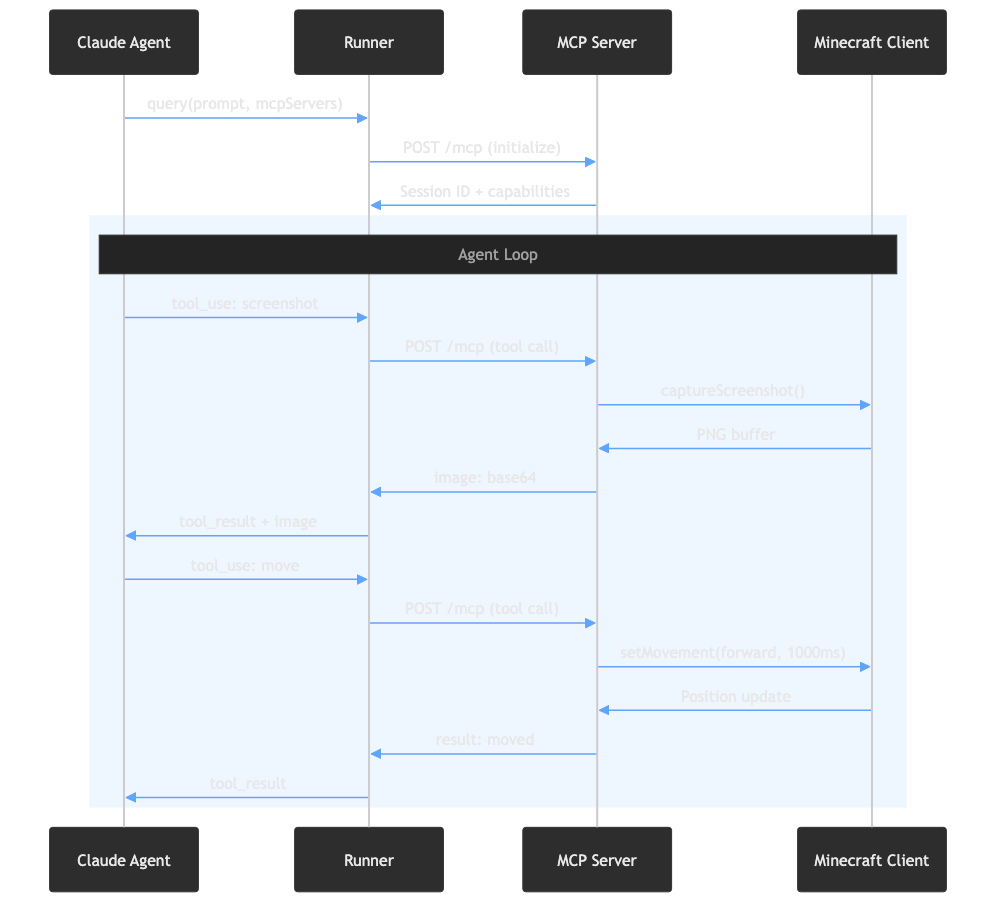
Running Claude with the Agent SDK
The Agent Loop
The Claude Agent SDK (formerly Claude Code SDK) gives you the same agent loop that powers Claude Code. You don't need to implement tools, compaction or an MCP client yourself - the SDK handles everything.
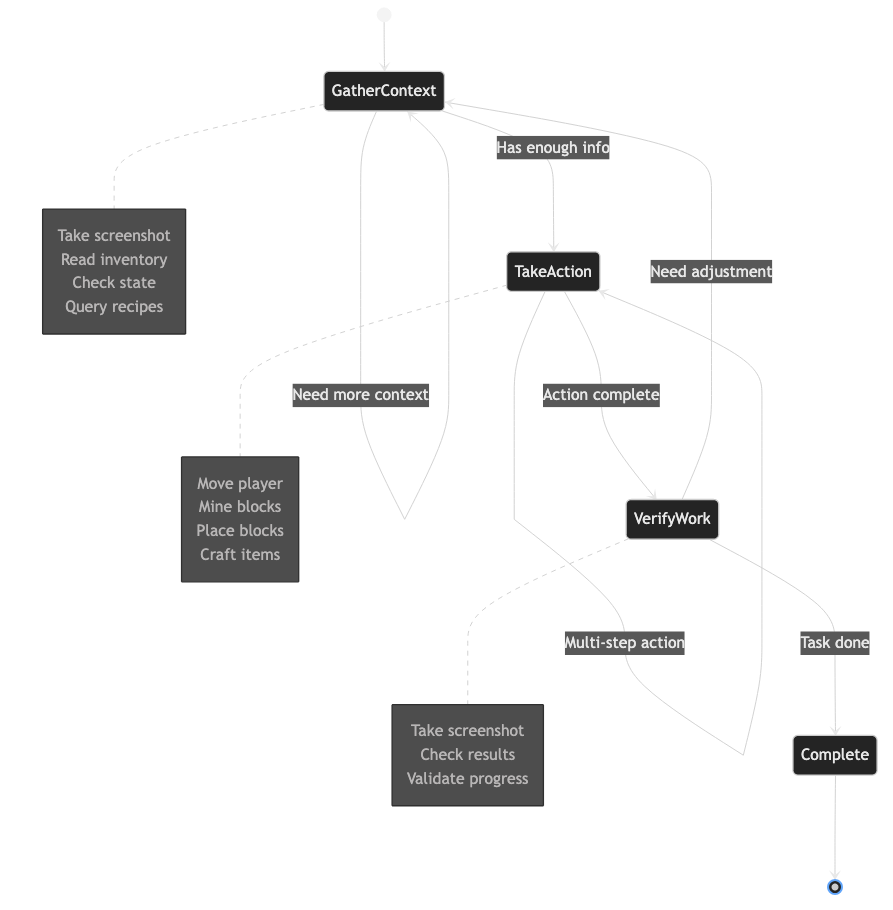
The basic pattern is dead simple:
import { query } from "@anthropic-ai/claude-agent-sdk";

for await (const message of query({
  prompt: "Continue your Minecraft adventure!",
  options: {
    mcpServers: {
      minecraft: {
        type: "http",
        url: "http://localhost:3001/mcp",
      },
    },
    allowedTools: ["mcp__minecraft"],
    model: "opus",
    maxTurns: 200,
  },
})) {
  // Process each message as it streams
  await processMessage(message);
}
Claude decides what to do, calls tools through MCP, sees the results, and keeps going. The SDK handles the entire loop.
Long-Running Sessions
One challenge with AI agents is context limits. Each Claude session can only hold so much context before it fills up. We handle this in two ways:
- Session compaction - We periodically call
/compactwhich summarizes the conversation history - Image pruning - Screenshots pile up fast. We keep only the last 50 images in context and replace older ones with placeholders
// Before each turn, prune old images if needed
const imageCount = countImagesInSession(sessionFile);
if (imageCount > MAX_IMAGES_TO_KEEP) {
  pruneSessionImages(sessionFile, MAX_IMAGES_TO_KEEP);
}

// Run compaction to summarize history
await query({ prompt: "/compact", options });
Streaming Events to the Frontend
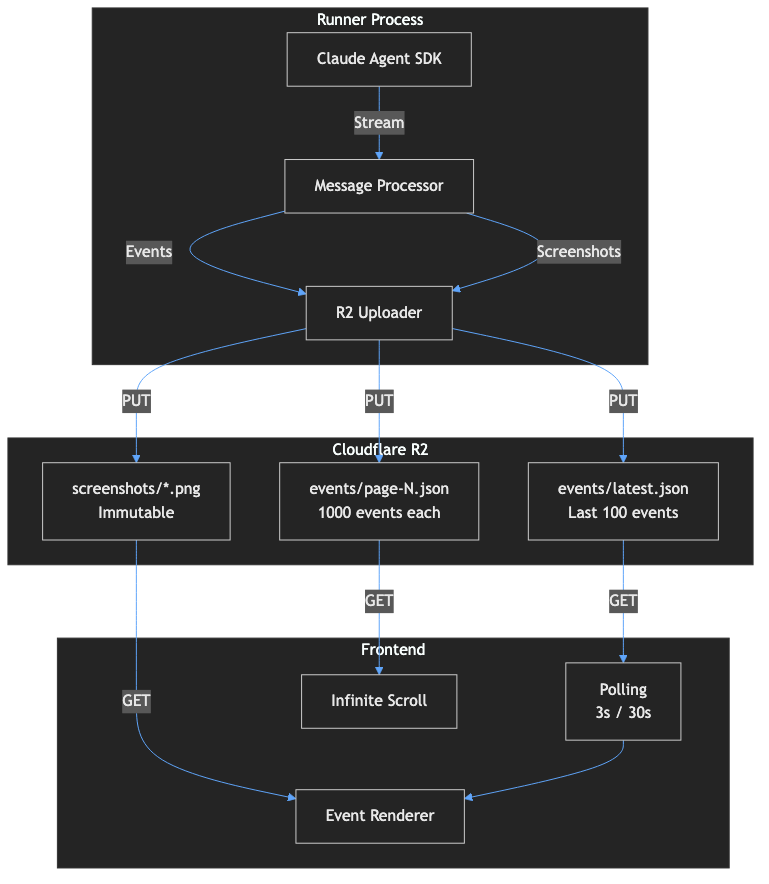
As Claude plays, we capture every message and upload it to Cloudflare R2:
async function processMessage(msg) {
  if (msg.type === "assistant" && msg.message?.content) {
    for (const block of msg.message.content) {
      if (block.type === "text") {
        await addEvent({ type: "comment", content: block.text });
      } else if (block.type === "tool_use") {
        await addEvent({
          type: "tool_use",
          toolName: block.name,
          actionParams: block.input
        });
      }
    }
  }
  // ... handle screenshots, tool results, etc.
}
Hosting at Scale with Cloudflare
The Cost Problem
Here's a fun question: how do you serve a live stream to potentially millions of viewers (we can dream, can't we?) without going broke?
Traditional cloud storage charges egress fees - you pay for every byte that leaves. AWS S3 charges about $0.09 per GB. If a million viewers each download 50MB of screenshots, that's $4,500 per month just in bandwidth.
Enter Cloudflare R2
R2 is Cloudflare's S3-compatible object storage with two killer features:
- Zero egress fees - You only pay for storage and operations, not bandwidth. Download a petabyte? Still $0 in egress.
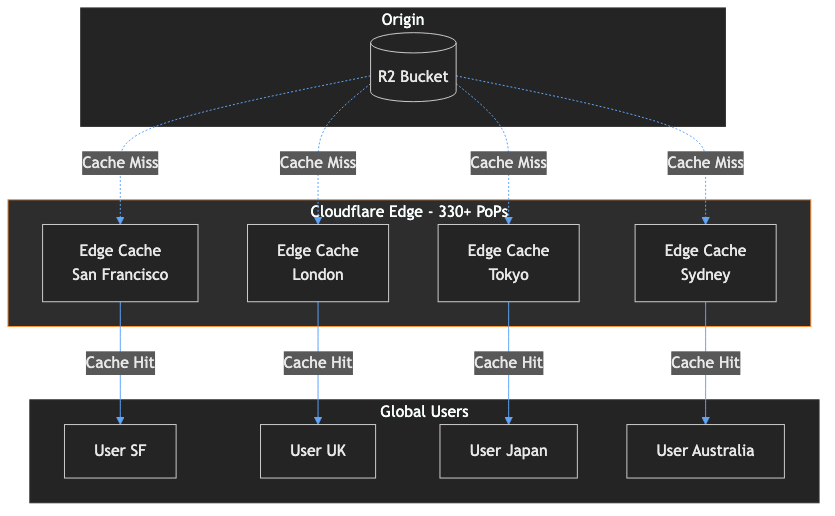
- Automatic edge caching - When you attach a custom domain to R2, Cloudflare automatically caches your content at 330+ edge locations worldwide. Set a
Cache-Controlheader and you're done.
This combination is incredible for serving media at scale. Your origin (R2) barely gets touched after the first request - everything gets served from edge cache.
| Viewers | Bandwidth | AWS S3 Cost | R2 Cost |
|---|---|---|---|
| 10,000 | 500 GB | ~$45 | ~$0 |
| 100,000 | 5 TB | ~$450 | ~$0 |
| 1,000,000 | 50 TB | ~$4,500 | ~$0 |
We store events in JSON files and screenshots as PNGs in R2. Everything is served through Cloudflare's global CDN (330+ data centers).
Cache Strategy
The magic is in the Cache-Control header. We use different strategies for different content types:
// Live events - short cache, updates frequently
await uploadToR2(
  "events/latest.json",
  JSON.stringify(data),
  "application/json",
  "public, max-age=5"  // 5 seconds
);

// Screenshots - immutable, cache forever
await uploadToR2(
  `screenshots/${imageId}.png`,
  buffer,
  "image/png",
  "public, max-age=31536000, immutable"  // 1 year
);
For latest.json, we use a 5-second cache. That means viewers poll every 3 seconds but the edge only fetches from R2 at most once every 5 seconds - a 60%+ reduction in origin requests. For screenshots, we use immutable which tells Cloudflare (and browsers) to cache forever without revalidation. Each screenshot has a unique UUID filename, so we never need to invalidate.
Infrastructure as Code
We use Alchemy for infrastructure management. Here's our entire R2 bucket configuration:
import { R2Bucket, DnsRecords } from "alchemy/cloudflare";

export const adventuresBucket = await R2Bucket("adventures-bucket", {
  name: "claude-adventures-storage",
  domains: "minecraft-data.gptkids.app",
  devDomain: true,
  allowPublicAccess: true,
  cors: [{
    allowed: { origins: ["*"], methods: ["GET", "HEAD"] },
  }],
});
The Frontend
The viewer is a simple static site hosted on Cloudflare Pages. It polls R2 for new events and renders them in an infinite scroll feed:
// Simple polling with adaptive intervals
const POLL_INTERVAL_LIVE = 3000;     // 3s when Claude is active
const POLL_INTERVAL_OFFLINE = 30000;  // 30s when waiting

async function fetchLatest() {
  const response = await fetch(`${API_BASE}/events/latest.json`);
  const data = await response.json();

  const newEvents = data.events.filter(e => e.timestamp > latestTimestamp);
  if (newEvents.length > 0) {
    appendEvents(newEvents);
    if (wantsToStayAtBottom) scrollToBottom();
  }
}
Nothing fancy - just HTML, CSS, and vanilla JavaScript. The frontend costs us literally nothing to host on Cloudflare Pages (free tier).
Wrapping Up
So there you have it - the complete stack:
- Minecraft Client - Custom client in Bun with SDL2 + WebGL rendering
- MCP Server - Exposes the game as tools and resources
- Claude Agent SDK - Runs the AI agent loop
- Cloudflare R2 - Stores events and screenshots with zero egress fees
- Cloudflare Pages - Hosts the frontend globally for free
The whole thing costs us basically just Claude API calls. The hosting infrastructure can scale to millions of viewers without us worrying about bandwidth bills.
If you want to build something similar, the MCP ecosystem is growing fast. Check out the MCP servers repository for hundreds of ready-to-use integrations.
Now go watch Claude mine some diamonds!